Service-area businesses can use Google Business Profile even when customers do not visit a storefront, but the setup must be handled carefully. This article explains how to create the right profile type, when to hide your address, how to define service areas, and how to prepare for video verification. You will learn what Google wants to confirm, why your smartphone matters, which mistakes can delay approval, and what to do if verification fails. Use the checklist, charts, examples, and the FAQ below to help verify Google Business Profile correctly and build a stronger local search foundation.
If you are a plumber, HVAC contractor, roofer, mobile notary, home healthcare provider, locksmith, cleaning company, or another business that travels to customers, this article supports our broader Google Business Profile management guide. That article explains the full system behind profile setup, optimization, reviews, posts, performance tracking, and local SEO.
This article goes deeper into one critical step: how to verify Google Business Profile for a service-area business without creating address, eligibility, or trust problems. It also connects to our related article on Google Business Profile and AI Search, because a properly verified profile is not just a map listing. It is a structured business data source that can help Google, AI search tools, and local customers understand who you are, where you operate, and what services you provide.
Getting this right matters. A service-area business profile can be extremely powerful, but it also has more setup traps than a storefront profile. Google must confirm that the business is real, local, eligible, and controlled by the rightful owner. That is why the process to verify Google Business Profile often involves mobile video, business documents, service tools, branded vehicles, nearby landmarks, and proof that the person submitting the profile actually represents the company.
E-Internet Marketing Services has a long history of helping service-area businesses verify their Google Business Profile.
What is a service-area business?
A service-area business is a company that visits customers at their locations instead of serving customers at a public storefront. The customer does not come to your office, warehouse, garage, home, or administrative address. You go to the customer.
Common examples include:
- Plumbers
- HVAC contractors
- Roofers
- Electricians
- Cleaning companies
- Mobile mechanics
- Mobile notaries
- Garage door repair companies
- Pest control companies
- Home healthcare providers
- Landscapers
- Locksmiths
These are only common examples. We recently helped a Pyschic and Tarrot Card Reader verify their Google Business Profile. If you have any questions, call or text us at 301-923-4333. It’s always better to ask in advance. Otherwise, you raise the risk of not getting verified.
For these businesses, Google Business Profile works differently than it does for a restaurant, dental office, retail store, or law office where customers visit a physical location. A service-area business may still use a real address for verification purposes, but that address usually should not be displayed publicly if customers are not served there.
This is one of the biggest differences business owners must understand before they verify Google Business Profile. Google is not only asking, “Does this business exist?” Google is also asking, “Does this business represent itself accurately to customers on Search and Maps?” That is where many problems begin.
When should you hide your address?
You should hide your address when customers do not visit your business location during stated business hours. This is especially important if you operate from a home office, a private administrative office, a warehouse, or another location that is not open to the public.
For example, a plumber working from a home office should not display the home address as if it were a customer-facing storefront. Instead, the plumber should set up the profile as a service-area business, remove the visible address, and list the cities, ZIP codes, counties, or local areas served.
Here is the practical rule: if a customer cannot walk in, meet staff, and receive service at that address, do not present it as a storefront. Hide it. Google wants the profile to reflect the customer experience, not just the administrative location of the business.
| Business situation | Best profile setup | Address visible? | Example |
|---|---|---|---|
| Customers visit your staffed office or storefront | Storefront profile | Yes | Dental office, restaurant, retail shop |
| You visit customers and do not serve them at your location | Service-area business profile | No | Plumber, roofer, home cleaning company |
| Customers visit your location and you also travel to them | Hybrid profile | Usually yes | Restaurant with delivery, showroom with installation service |
| You work online only with no in-person customer contact | Usually not eligible for a local Business Profile | No | Online-only course, e-commerce-only store |
Hiding your address does not mean Google ignores your location. Google still needs a real business base to evaluate eligibility, service area, proximity, and verification. You are simply telling Google not to show that address to customers.
What does Google want to verify?
When you attempt to verify Google Business Profile, Google is trying to confirm three core things:
- The business location is real. Google wants evidence that your business is connected to the location you provided, even if the address is hidden from public view.
- The business actually exists and operates. Google wants to see tools, equipment, vehicles, uniforms, paperwork, workspace, products, or other signs that the company is active.
- You are authorized to manage the profile. Google wants proof that the person completing verification represents or controls the business.
That is why video verification often asks for more than a quick shot of a house, office, or van. A weak video says, “Here is a place.” A strong video says, “Here is the location, here is the business operation, and here is proof that I control this business.”
| Verification goal | What Google wants to understand | Good examples to show | What to avoid |
|---|---|---|---|
| Location | The business is connected to the location used for setup | Street sign, house number, nearby landmark, recognizable neighborhood marker | Empty fields, random parking lots, unclear surroundings |
| Business existence | The business has real operations | Tools, work vehicle, invoices, business cards, branded apparel, equipment | Generic office supplies with no business connection |
| Management authority | You can access and control business assets | Unlocking a branded vehicle, accessing a workspace, showing a non-sensitive permit or invoice | Showing private tax records, bank data, IDs, or unrelated personal items |
Think of verification like a short evidence walk-through. Your goal is not to make a commercial. Your goal is to help Google confidently verify Google Business Profile without confusion.
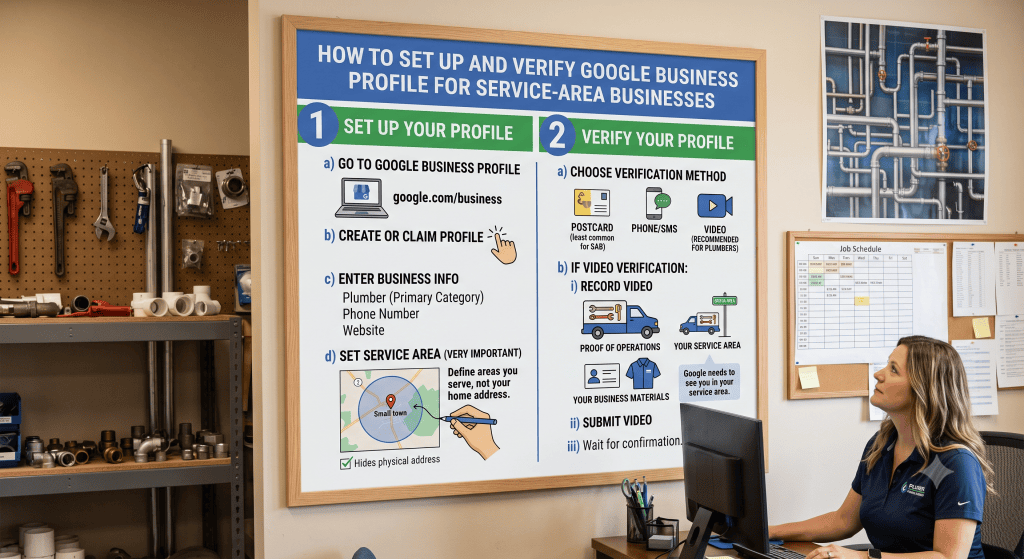
How do you set up a service-area business profile correctly?
Before you try to verify Google Business Profile, set up the profile carefully. A sloppy setup can trigger unnecessary review, failed verification, or even suspension.
Follow this sequence:
- Use the correct Google account. Use an account you control long term. Do not let a temporary employee, freelancer, or outside vendor create the profile under an account you cannot access. You should always be the Primary owner of your Google Business Profile account. You can always assign others as managers, but you need to own your account!
- Search for an existing listing first. Before creating a new profile, search Google Maps for your business name, phone number, and address. If a profile already exists, claim it instead of creating a duplicate.
- Use your real-world business name. Do not stuff extra keywords into the business name. “Smith Plumbing LLC” is appropriate if that is your actual business name. “Smith Plumbing LLC Emergency Water Heater Repair Best Plumber Dallas” is a problem waiting to happen.
- Choose the most accurate primary category. Pick the category that best describes your core business. A roofing company should usually choose “Roofing contractor,” not a broad category like “Contractor” unless no more accurate option fits.
- Add accurate service areas. Use cities, ZIP codes, counties, or regions you actually serve. Do not list the entire United States unless you truly provide in-person services nationally, which most local service businesses do not.
- Hide the address if customers do not visit. This is critical for home-based and field-service businesses.
- Add a real phone number and website. Use a phone number controlled by the business and a website that clearly represents the same business name, category, and service area.
- Complete your services, hours, description, and photos. Build a complete profile before or immediately after verification.
Example: A mobile notary in Phoenix should not create five separate profiles for different suburbs unless each location has separate staff, separate operations, and a real eligible location. The better approach is usually one service-area profile with accurate service areas such as Phoenix, Scottsdale, Tempe, Mesa, and Chandler.
How should you define your service areas?
Your service area tells customers where you provide services. It also helps Google understand your local relevance. Service areas should be specific, accurate, and realistic.
Do not treat the service area field like a wish list. A roofer based in Tampa should not add every major city in Florida unless the business truly has the staff, logistics, and service operations to cover that area. Overreaching can create trust problems and weaken the clarity of your profile.
Good service-area entries may include:
- Specific cities
- ZIP codes
- Counties
- Recognized regions
- Neighborhoods or local areas accepted by Google
Weak setup: “United States” for a one-truck appliance repair company based in Cleveland.
Better setup: Cleveland, Lakewood, Parma, Shaker Heights, Cleveland Heights, Rocky River, and nearby ZIP codes actually served.
A focused service area is not a limitation. It is a clarity signal. The better Google understands where you serve, the easier it is to match your business to relevant local searches.
How do you prepare for video verification?
Video verification is one of the most common steps for service-area businesses. The best way to verify Google Business Profile by video is to prepare before you press record.
Google typically wants one continuous, unedited recording. You usually cannot record a video offline, edit it, and upload it later. The video should show the right proof in one smooth sequence.
Prepare these items before starting:
- Your smartphone with a strong internet connection
- Access to the Google account that owns or manages the profile
- Your business vehicle, tools, products, or equipment
- Business cards, branded shirts, yard signs, invoices, permits, or non-sensitive business documents
- Nearby street signs, house number, building number, or landmarks
- A clear path from the outside location marker to the business proof
Do not include sensitive information such as bank account numbers, tax IDs, Social Security numbers, private customer data, or other people’s faces. If you show a document, cover or avoid anything private. The document only needs to help confirm the business name, location, or authority. This is a simple process. Do not overthink it.
Sample video flow for a home-based HVAC contractor
- Start outside and show a nearby street sign or recognizable neighborhood marker.
- Show the house number or business base without showing private details longer than needed.
- Walk to the work van and unlock it.
- Show branded vehicle markings, HVAC tools, gauges, parts, or equipment.
- Show a business card, invoice, license, or utility bill with private details covered.
- End after clearly showing location, business existence, and management authority.
This kind of video helps Google verify your Google Business Profile because it connects the business location, business activity, and business control in one recording.
We recommend you do a dry-run. Prepare the worksite. On a table or desk, just lay out some business cards, invoices (blank is fine) with you company name on it. If you have your business license with an EIN on it, that works great. Be careful here. Blur out your EIN. Locate your nearest street sign with name of your street or cross street. Then, walk to you business location, unlock the door and walk inside. How long did that take? The sweet spot is 60-90 seconds for your video for getting approved on your first try.
This is how I recently verified a Google Business Profile for a client. Please note that I verbally explained what we were doing in the video. This particular service business operated out of his home trailer, with a work truck in the driveway. I started at the cross street of his business. I started the video saying this is the cross street of the business “third and main street.” Now, I am walking to the business location. Here is a truck where he stores some of his tools. Now I’m walking to the front door. I’m unlocking the front door and entering his business. On this table, I’m showing his business cards, business checks and some blank business invoices.
I then uploaded the video and this verified his Googe Business Profile. I believe in this case, we were notified within 24 hours.
Why does using your smartphone matter?
 Your smartphone matters because Google’s video verification process is designed around mobile recording and upload through your Business Profile. A smartphone can also provide location context, camera access, and a direct connection to the Google account managing the profile.
This is why you should not treat video verification like a YouTube video. Do not shoot it with a separate camera, edit it, add captions, export it, and then try to upload it. That is the wrong mindset. About five years ago we made a similar mistakes. We shot the video, saved it to our phone and tried to upload it. This verification needs to be done in one continuous motion. Shot the video and upload it. It’s really that simple.
Before you begin, check three things:
- Battery: Make sure your phone has enough power.
- Connection: Use a reliable cellular or Wi-Fi connection.
- Access: Confirm you are signed into the Google account connected to the profile.
If you are helping a business owner remotely, have the owner use their own smartphone whenever possible. The phone is in the right physical location, the owner can access business-only assets, and the recording is more likely to reflect the real business operation. For service-area businesses, that matters.
What are common setup mistakes that trigger problems?
Most verification problems are self-inflicted. Business owners often rush to create the profile and then get surprised when Google asks for stronger proof. To verify Google Business Profile smoothly, avoid these common mistakes.
| Mistake | Why it creates problems | Better approach |
|---|---|---|
| Displaying a home address | It misrepresents the business as a customer-facing storefront | Hide the address and list accurate service areas |
| Using keyword-stuffed business names | It violates naming guidelines and looks spammy | Use the real legal or real-world business name |
| Creating duplicate profiles | Duplicates confuse Google and customers | Search first, then claim the existing profile if one exists |
| Choosing a vague category | It weakens relevance for local searches | Select the most specific accurate primary category |
| Listing service areas too broadly | It can look unrealistic or misleading | Use cities, ZIP codes, or areas actually served |
| Changing major details during verification | It may trigger re-verification or delays | Set the profile correctly before starting verification |
| Showing weak proof in the video | Google may not see enough evidence to approve the profile | Show location, business tools, and proof of management |
Here is the simplest way to think about it: make the profile match the real business. Google is good at spotting mismatch. The business name, website, phone number, category, service area, documents, and video proof should all tell the same story.
What should you do if verification fails?
If verification fails, do not panic and do not immediately make random changes. Verification failure usually means Google could not confirm something clearly enough. Your job is to identify the weak point and correct it.
Take these steps:
- Read the issue message carefully. If Google provides a “Review issues” notice, follow the prompts.
- Check your business name. Remove extra keywords unless they are part of your real-world business name.
- Check your address setting. If customers do not visit, make sure the address is hidden.
- Check your service areas. Make sure they are realistic and specific.
- Check your website. Your website should show the same business name, services, phone number, and local service focus.
- Prepare stronger proof. Gather documents, tools, branded items, vehicle access, and location markers.
- Record a better video. Include all required evidence in one continuous recording.
- Contact support if needed. If you have followed the requirements and still cannot verify, use Google’s support options.
A failed attempt does not always mean the business is ineligible. It may simply mean the proof was incomplete. For example, a pest control company may show a truck and tools but fail to show nearby location markers. Or a cleaning company may show a street sign and office but fail to show proof of management. To verify Google Business Profile, the evidence needs to be complete, not just convenient.
What service-area business setup checklist should you follow?
Use this checklist before starting verification. It is much easier to set things up correctly the first time than to fix a profile after it gets stuck.
| Checklist item | Why it matters | Completed? |
|---|---|---|
| Search Google Maps for existing profiles | Prevents duplicates and ownership conflicts | □ |
| Use the correct long-term Google account | Protects ownership and access | □ |
| Enter the real business name | Reduces suspension and verification risk | □ |
| Select the most accurate primary category | Improves relevance for local searches | □ |
| Add accurate secondary categories if appropriate | Clarifies related services | □ |
| Hide the address if customers do not visit | Matches Google’s service-area business rules | □ |
| Add specific service areas | Shows where the business actually operates | □ |
| Add a business-controlled phone number | Supports customer trust and verification | □ |
| Link to a website with matching NAP information | Reinforces consistency across the web | □ |
| Prepare video verification proof | Increases the chance of approval | □ |
| Avoid major edits during verification | Reduces delays and re-verification risk | □ |
Once the checklist is complete, you are in a better position to verify Google Business Profile and move on to optimization, reviews, photos, updates, and local ranking improvement.
How does verification support AI search visibility?
Verification is not just an administrative hurdle. A verified Google Business Profile gives Google a structured, trusted source of business information. That can matter even more as search becomes more AI-driven.
AI-powered search experiences depend on clear business entities, accurate services, location signals, reviews, photos, categories, and fresh updates. A verified and well-maintained profile gives search systems cleaner information to work with.
For example, when someone searches for “emergency plumber near me open now,” Google needs to understand several things quickly:
- What businesses provide emergency plumbing
- Which ones serve the searcher’s area
- Which ones are open or available
- Which profiles have reviews and proof of real-world activity
- Which business data appears trustworthy
This is why setup and verification should be treated as the foundation of your local search system. If Google cannot confidently verify Google Business Profile, everything else becomes harder: visibility, reviews, calls, directions, customer trust, and AI-assisted discovery.
What examples show the right way to verify a service-area profile?
Example 1: HVAC contractor in Ohio
A small HVAC company operates from the owner’s home and serves customers within 45 minutes. The owner hides the home address, lists nearby cities and ZIP codes, uses “HVAC contractor” as the primary category, and records a video showing the street sign, service van, HVAC tools, branded shirt, and a non-sensitive business license. This is a strong setup because the profile matches how the business actually operates.
Example 2: Mobile notary in Texas
A mobile notary travels to customers by appointment. She hides her address, lists her actual service cities, adds appointment-based hours, uses a business phone number, and links to a website explaining her mobile notary services. During verification, she shows her notary supplies, business card, service area location, and proof she controls the business. This helps Google verify Google Business Profile without confusing the business with a walk-in office.
Example 3: Roofing company in Florida
A roofing company uses a warehouse for equipment but does not allow customers to visit. The owner hides the warehouse address, lists specific service areas, shows branded trucks, roofing equipment, nearby street signs, and business paperwork during video verification. The setup is honest, clear, and aligned with the customer experience.
How can E-Internet Marketing Services help you verify your Google Business Profile?
Trying to verify Google Business Profile can feel simple until Google asks for proof, rejects a video, flags an address issue, or reopens verification after an edit. That is where experience helps.
E-Internet Marketing Services works with clients nationally through video conferencing. You do not need to be located in Maryland. We can meet with you by Google Meet, review your setup, help you avoid common mistakes, prepare your verification evidence, and guide you through the steps needed to build a stronger service-area Google Business Profile.
 Call today to set up a 30-minute Google Meet and get your questions answered: 301-923-4333.
If your business depends on local calls, local leads, and local trust, your Google Business Profile should not be guessed together. A few minutes of planning can prevent weeks of frustration. Google verification is not a game of hide-and-seek, but it sure feels like Google keeps moving the flashlight.
What questions do service-area businesses ask about Google Business Profile verification?
Can I have a Google Business Profile if I work from home?
Yes, many home-based service-area businesses can have a Google Business Profile if they make in-person contact with customers. The important point is that you should normally hide your home address if customers do not visit your home for service. We are the perfect example. We are based in White Plains, Maryland. This is our business address. This is my home. We are an LLC with a federal EIN. This is the address we use for our business.
Do I need to show my address to customers?
No, not if you are a true service-area business and customers do not visit your location. You can hide your address and display your service area instead.
Can I use a virtual office to verify Google Business Profile?
Virtual offices are risky and often do not meet Google’s eligibility expectations unless the location is properly staffed and represents a real customer-facing business location. For most service-area businesses, use a legitimate business base and hide the address if customers do not visit.
How long does Google Business Profile verification take?
Timing varies by verification method and review status. Some profiles verify quickly, while video or additional review may take longer. Avoid changing major business details during the verification process because that can create delays.
What should I show in a service-area business video verification?
Show your location context, business tools or equipment, and proof that you manage the business. Good examples include street signs, nearby landmarks, a branded vehicle, work tools, business cards, invoices with private details covered, licenses, permits, or access to business-only assets.
Can someone else complete verification for me?
The business owner or authorized representative should be involved, especially for video verification. A consultant can guide the process, but the person recording often needs access to the business location, tools, documents, vehicle, or workspace.
Should I add every city I want to rank in?
No. Add areas you actually serve. A realistic service area is better than an exaggerated one. Google wants accurate information, and customers want to know whether you truly serve their location.
What happens if I fail verification?
Review the issue, correct any setup problems, gather stronger proof, and try again using the method Google provides. If you still cannot verify Google Business Profile after following the requirements, contact Google Business Profile support.
Can I create multiple profiles for one service-area business?
Usually, a service-area business should have one profile for the area it serves. Multiple profiles may be appropriate only when there are separate real locations, separate staff, and separate service areas that meet Google’s rules.
Why does verification matter after the profile is live?
Verification gives you control over your profile and helps confirm that the business is legitimate. Without verification, you may not be able to fully manage the profile, respond properly, or build a strong local search presence.
Rick Samara: Bio
 Rick Samara is the founder and co-owner of E-Internet Marketing Services LLC and an award-winning author. You can find his book AI for Beginners Demystified on Amazon. Today, he focuses on helping small businesses understand and use AI, local search, and practical digital marketing systems. Rick has spent more than 20 years working in digital marketing and local SEO, helping service businesses, healthcare practices, professional firms, and local companies improve their visibility in Google Search, Google Maps, and the Google 3-Pack. His current work focuses on helping small business owners implement AI tools, strengthen their Google Business Profile management, and compete more effectively in an AI-driven search environment. There is a ton of material on learning the basics of AI on his author website. Check it out @ https://ricksamara.com.
What should you read next about Google Business Profile setup and verification?
Further Reading
- Google. (n.d.). Verify your business on Google. Google Business Profile Help. https://support.google.com/business/answer/7107242
- Google. (n.d.). Verify your business with a video recording. Google Business Profile Help. https://support.google.com/business/answer/14271705
- Google. (n.d.). Manage your service areas for service-area & hybrid businesses. Google Business Profile Help. https://support.google.com/business/answer/9157481
- Google. (n.d.). Manage your business address. Google Business Profile Help. https://support.google.com/business/answer/2853879
- Google. (n.d.). Guidelines for representing your business on Google. Google Business Profile Help. https://support.google.com/business/answer/3038177
- Google. (n.d.). Tips to improve your local ranking on Google. Google Business Profile Help. https://support.google.com/business/answer/7091
- Google. (n.d.). Stand out on Google with a free Business Profile. Google Business Profile. https://business.google.com/us/business-profile/