Choosing accurate Google Business Profile Categories and Services helps Google understand what your company does, where it operates, and which searches it should match. Your primary category provides the clearest description of the business, while carefully selected additional categories expand relevance without confusing Google. Detailed services reinforce those categories and help customers recognize that you solve their specific problems. Complete NAP+H information, including business name, address, phone number, and hours, supports trust and consistency. This guide explains category selection, service organization, common mistakes, competitor research, website alignment, and an optimization process for stronger local visibility across the United States.
A Google Business Profile is more than a map listing. It is a structured source of business information that helps Google understand who you are, where you operate, and what you offer. One of the most important parts of that structure is Google Business Profile Categories and Services.
Google states that business categories affect local rankings. Google also says a service may be highlighted when a nearby customer searches for something the business offers. That makes Google Business Profile Categories and Services a major relevance signal and an important customer-conversion tool. This article supports our complete Google Business Profile Management Guide. It explains how to choose Google Business Profile Categories and Services accurately, align them with your website, and avoid the common mistake of treating the profile like a keyword storage locker.
We now offer AI Google Business Profile management, which is much more efficient and cost-effective. See how AI Google Business Profile Management works!
Why Do Google Business Profile Categories and Services Matter for Local Rankings?
Google says local results are mainly based on relevance, distance, and prominence. Relevance is how closely a profile matches the search. Distance considers how far the business is from the searcher or the location used in the query. Prominence reflects how established and well-known the business appears, using signals such as links, reviews, and ratings. You cannot move closer to every searcher, and Google does not sell guaranteed organic local rankings. You can improve relevance by giving Google complete, accurate, and detailed information. Google Business Profile Categories and Services are central to that work.
What is the End Game? What is the Benefit to Your Business?
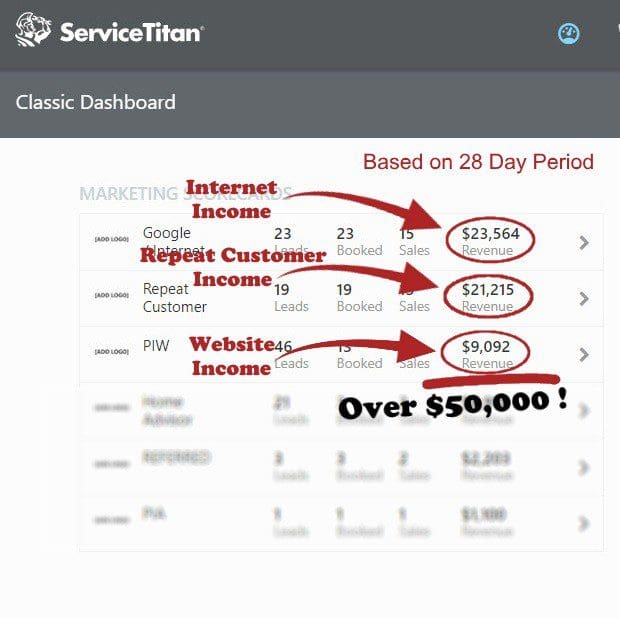
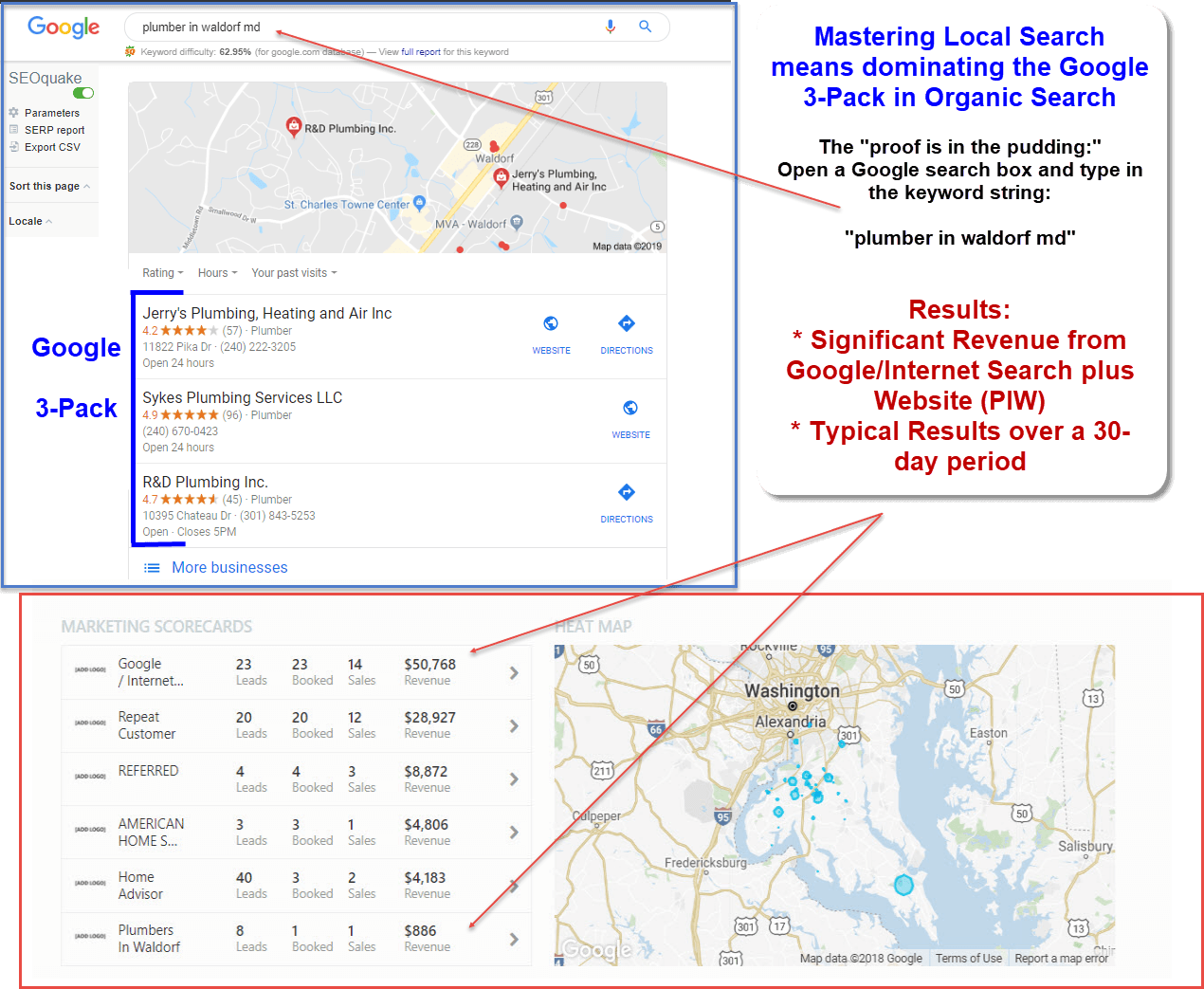
This all helps get your Google Business Profile (GBP) listed in the Google 3-Pack or Map Pack in local search. This is a huge advantage to you, and here is why:
 1. Prime Search Real Estate
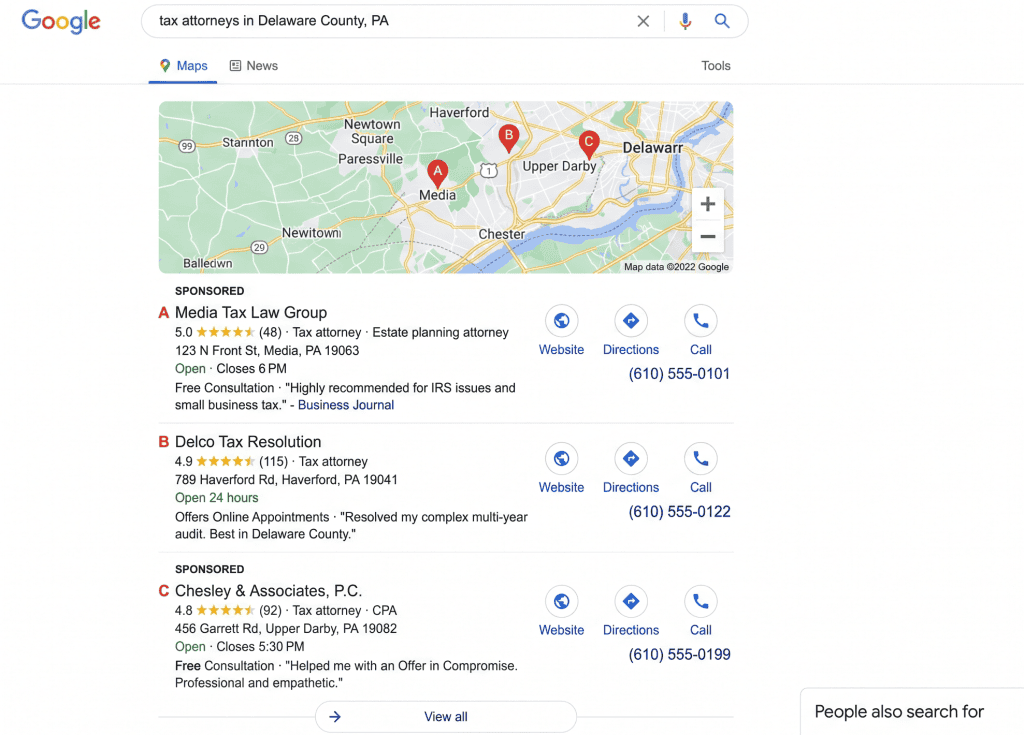
The 3-Pack is positioned above standard organic search results on both desktop and mobile. Before users even see traditional website links, their eyes go directly to the map and the top three business listings.
2. High Share of Clicks & Traffic
Studies consistently show that the local 3-Pack captures over 40–50% of all clicks on local search results pages. Users rarely click “More places” unless none of the top three meet their criteria.
3. Immediate High-Intent Conversions
Local searches carry extremely strong purchasing intent. Users searching for a service locally are usually looking to buy, call, or visit immediately:
One-Click Actions: Users can tap directly to get driving directions, call your store, or visit your website.
Near Me Searches: Over 75% of users who search for a local business on mobile visit a related business within 24 hours.
4. Built-in Social Proof & Trust
The 3-Pack displays key trust factors upfront:
Star ratings and review volume
Business photos and operating status (e.g., “Open now”)
Years in business and specific services offered
A 4.5-star listing with hundreds of reviews in the 3-Pack establishes instant credibility over competitors listed lower down the page.
5. Mobile Search Dominance
On smartphones, the Google 3-Pack often occupies 100% of the screen space beneath paid ads. Appearing here gives you maximum visibility on mobile devices where local searches overwhelmingly take place.
Google’s Three Main Local Ranking Factors
| Ranking Factor | What It Means | What You Can Improve |
|---|---|---|
| Relevance | How closely the profile matches the search | Categories, services, description, website content, attributes, and profile completeness |
| Distance | How far the business is from the searcher or named location | Accurate address or service area; distance itself cannot be manipulated |
| Prominence | How established and trusted the business appears | Reviews, ratings, links, citations, photos, and ongoing activity |
When evaluating Google Business Profile Categories and Services, remember that Google does not publish a percentage formula for these factors. The practical lesson is that Google Business Profile Categories and Services help define what your business does, but they perform best when supported by correct location data and strong trust signals.
What Does Google Mean by Complete and Detailed Business Information?
Google advises businesses to provide complete and accurate information so their profiles can appear for relevant local searches. Useful fields include the address, phone number, business type, hours, and other details that help customers understand the company. Google Business Profile Categories and Services setup begins with complete information, including:
- Real-world business name
- Accurate address or properly configured service area
- Local phone number controlled by the business
- Current regular and special hours
- Primary and additional categories
- Detailed service list
- Website address
- Business description
- Appropriate attributes
- Photos and videos
- Review responses
- Booking, menu, ordering, or appointment links when available
“Complete” does not mean stuffing every field with promotional language. It means using every relevant field truthfully. Your Google Business Profile Categories and Services should also agree with your website. If the profile lists water heater installation, the website should clearly indicate that the company provides this service.
This consistency matters in AI-driven search as well. Our article on Google Business Profile and AI Search explains how structured categories, services, hours, reviews, and location details help search and answer engines interpret a business as a verified local entity.
What Does NAP+H Mean, and Why Does It Support Google Business Profile Categories and Services?
NAP+H stands for:
- N: Business Name
- A: Business Address
- P: Business Phone Number
- H: Business Hours
Google Business Profile Categories and Services tell Google what the company does. NAP+H tells Google who the business is, where it operates, how customers can reach it, and when it is available.
NAP+H Accuracy Checklist
| Element | Correct Example | Risky Example | Why It Matters |
|---|---|---|---|
| Name | Smith Plumbing LLC | Smith Plumbing LLC – Best 24/7 Plumber | The name should match the real-world business |
| Address | 101 Main Street, Suite 200 | An old address or rented virtual office | Google needs an accurate location or properly hidden service-area address |
| Phone | A local number answered for that location | An unrelated lead-routing number | Customers and Google should reach the actual business |
| Hours | Regular hours plus holiday updates | Open 24 hours when nobody responds overnight | Accurate hours protect trust and customer experience |
Google’s guidelines say a business should be represented consistently as it is recognized in the real world. Google also recommends accurate service areas and, when possible, a local phone number controlled by the business. Accurate and complete information reinforces Google Business Profile Categories and Services. When names, addresses, phone numbers, hours, categories, and services agree across Google, the website, and trusted directories, the business is easier for customers and search systems to understand.
How Should You Choose the Primary Category?
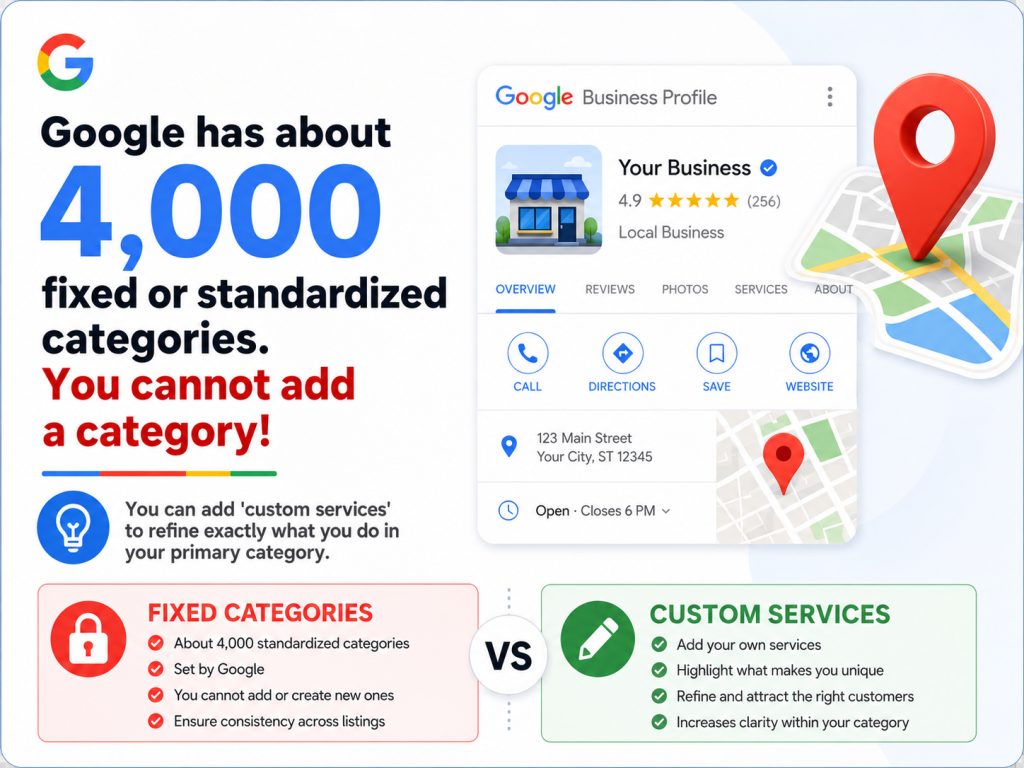
Be aware, because I have personally faced this issue a few times. Google has about 4,000 fixed or standardized categories. You are stuck with these categories. If you can’t find what you believe is your category, you cannot add a category. But keep this in mind. You can add “custom services” to refine exactly what you do in your primary category.
Here is an example:
This is based on my actual experience with a company that offers well service and repairs. His primary category is well drilling contractor. But, he is not a “well drilling contractor.” It was set up this way by the business owner before he hired us. Google does not have a category for “well repair company” or “well service company.”
These are the instructions provided by Google Gemini. If Well drilling contractor is set as your primary category, Google will automatically populate a set of pre-configured, industry-standard options in your profile’s service menu (such as well drilling, installation, or deep-well services). However, because your core focus is repair rather than new drilling, you can easily build out your specific offerings using custom services. And, you want to delete in your service’s menu services such a well drilling, installation, or deep well services!
Here is how you can set up and organize custom repair services on your Google Business Profile, using this example:
Step-by-Step Instructions:
- Log in to your profile: Open Google, make sure you are signed into the Google account that manages your business, and search for your business name (or go to your Google Business Profile dashboard).
- Navigate to Services: * On your profile dashboard, select Edit profile (or Edit services, depending on the interface view).
- Click on Services.
- Add Custom Services:
-
If Google suggests generic drilling services that don’t fit, delete them and look for the option to Add custom service.
-
Type in your exact repair offerings one by one. Good examples to include:
-
Well pump repair
-
Pressure tank replacement
-
Well troubleshooting & diagnostics
-
Emergency water well repair
-
Submersible pump repair
-
-
- Organize into Categories (Optional): If you offer a wide variety of fixes, you can group them under custom service sections (e.g., creating a section specifically labeled “Well Repair & Maintenance”).
- Add Descriptions: For each custom service you add, click the pencil/edit icon to include:
-
- A clear description and pricing: Briefly explain what the service entails (e.g., “Fast diagnostics and repair for failing well pumps, low pressure, and electrical issues”).
- Pricing: You can leave this blank if you provide custom quotes, or add a starting price if applicable. I recommend you leave the pricing blank unless you have fixed prices for your services.
- Save Changes: Click Save to go live.
When configuring Google Business Profile Categories and Services, the primary category should be the most specific available category that accurately completes this sentence:
“This business is a __________.”
Google advises businesses to select categories describing what the business is, not everything it has. Google also recommends using as few categories as necessary and choosing the most specific category that represents the core business. I agree! In fact, I’ll take this one step further. Only use one category, if possible. Things can get very confusing when you use more than one category. And Google does not like confusion.
- A company mainly repairing and installing plumbing systems may choose Plumber.
- A practice focused on children’s dentistry may choose Pediatric Dentist instead of the broader Dentist.
- A contractor specializing in heating and cooling may choose HVAC Contractor.
- A pizza business offering only delivery and takeout should not claim a dine-in category it does not fit.
The primary category is the strongest category-level statement in Google Business Profile Categories and Services. Choose it according to the company’s main operation, not simply the service with the highest profit or the keyword with the largest search volume.
Ask three questions:
- What does the business primarily do today?
- Which category best matches the services shown on the website?
- Which category would an ordinary customer use to describe the company?
The best primary category for Google Business Profile Categories and Services is truthful, specific, and easy to defend.
Here is a word of caution. Do not change your primary category. This could trigger a video reverification.
How Many Additional Categories Should You Add?
Okay…okay, I get it. Google permits additional categories, but more is not automatically better. Its guidance is to use a few categories that describe the overall core business rather than adding one for every product or service. Only use an additional category when it represents a meaningful and established part of the business. Do not use categories merely as keyword variations.
The strongest Google Business Profile Categories and Services configuration is narrow enough to be clear and broad enough to reflect the company’s genuine capabilities.
Category changes can also affect available profile features and may trigger reverification. Google notes that categories can unlock features such as booking buttons, menus, amenities, and service options depending on the business type. Change Google Business Profile Categories and Services deliberately rather than swapping categories every week to chase rankings.
After selecting categories, continue optimizing Google Business Profile Categories and Services by creating a service list that reflects what customers can actually purchase. Google allows service businesses to select suggested services, add custom services, organize services under categories, and include descriptions or prices. A matching service may also be highlighted when a customer searches for it. The service editor is an important part of Google Business Profile Categories and Services optimization.
Category: Plumber
Services:
- Emergency plumbing
- Drain cleaning
- Water heater repair
- Water heater installation
- Pipe repair
- Faucet installation
- Toilet repair
- Sump pump service
Avoid vague entries such as “quality solutions” or “professional help.” Customers search for recognizable problems and services, not business advertising or slogans.
A short service description may explain what the service includes, who it helps, the problem it solves, and any important limitations.
Service Description Example
Water Heater Repair: Diagnosis and repair of leaking, noisy, or nonheating conventional and tankless water heaters throughout the company’s documented service area.
Do not place phone numbers, unsupported claims, or awkward keyword lists inside custom service names. Google says some custom services may be rejected, including entries containing personal information, prices in the name, gibberish, or prohibited language. Accurtat Google Business Profile Categories and Services make the profile easier to understand and give customers more reasons to take the next step.
How Can You Match Google Business Profile Categories and Services to Your Website?
Your website and Google Business Profile Categories and Services should tell the same business story. If the primary category is HVAC contractor, the website should clearly describe HVAC work. If the profile lists furnace installation, duct cleaning, and emergency AC repair, those services should appear on relevant website pages.
This alignment makes Google Business Profile Categories and Services more credible because the website provides supporting context. This is fundamental for local search and Local SEO. Google’s guidelines state that category information may also be detected from a company’s website and mentions elsewhere on the web. This helps build organic visibility. Organic visibilty is best for your business over the long term.
 By comparison, some businesses prefer to run paid or sponsored search, or ads. This is also know as Pay-Per-Click, or PPC. When a business runs a PPC ad campaign, they are charged for every click on their ad. Paid advertising can provide immediate exposure, but organic optimization builds an asset rather than continually renting visibility. Plus, when you stop paying for your ads, they stop appearing. For a cost comparison between organic versus paid search, read Google Business Profile Advantage: The Real Cost of Local Visibility.
How Can You Research Competitor Categories Without Copying Them?
To research Google Business Profile Categories and Services, search Google Maps for your main service in several cities or ZIP codes within the actual market. Review businesses that consistently appear, then compare:
- Their visible primary category
- Their website’s main positioning
- Services emphasized in navigation and page titles
- Review language describing specific work
- Whether the category accurately fits the business
- Gaps your company can fill with clearer information
The goal is not to imitate every category used by a ranking competitor. Competitors can be wrong, outdated, or violating guidelines. Use their profiles as market evidence, then choose Google Business Profile Categories and Services that accurately represent your own business.
A plumber does not become an electrician because the electrician across town ranks well. Categories are descriptive fields, not Halloween costumes.
What Common Mistakes Weaken Google Business Profile Categories and Services?
The most common Google Business Profile Categories and Services mistakes include:
- Selecting a broad category when a more accurate specific category exists
- Choosing a primary category based only on search volume
- Adding unrelated categories to reach more searches
- Treating categories as a list of every service
- Listing services the company does not provide
- Using inconsistent service names across the profile and website
- Leaving discontinued services visible
- Stuffing cities, phone numbers, prices, or promotions into service names
- Changing categories repeatedly without a business reason
- Ignoring features unlocked by the selected category
Review Google Business Profile Categories and Services at least quarterly and whenever the company adds a major service, removes a service, changes its main focus, or opens a location. Updates should reflect real operational changes, not temporary ranking experiments.
What Process Should You Use to Optimize Google Business Profile Categories and Services?
Use this seven-step Google Business Profile Categories and Services process:
- Define the core business. Write one plain-language sentence explaining what the company primarily is.
- Select the most specific accurate primary category. Confirm it matches the real-world business and website.
- Add only meaningful secondary categories. Each should represent a genuine part of the company.
- Create a complete service inventory. List every active service customers can purchase.
- Group services under relevant categories. Keep the structure clear.
- Align the website and listings. Match terminology, NAP+H, hours, and service information.
- Measure and refine. Review calls, website clicks, direction requests, leads, profile performance, and ranking visibility.
The purpose of Google Business Profile Categories and Services optimization is not to manipulate Google. It is to remove ambiguity. Clear information gives Google a better foundation for matching the business to relevant searches.
How Can E-Internet Marketing Services Help Nationwide?
Managing Google Business Profile Categories and Services may seem simple, but a single selection can affect relevance, service organization, available profile features, and how the company appears in Google Search and Maps. E-Internet Marketing Services helps small businesses select and maintain Google Business Profile Categories and Services, align profiles with website content, improve listing consistency, strengthen review strategies, and develop an ongoing local visibility system. Furthermore, while we have a long history of success managing Google Business Profiles (GBPs), times have certainly changed with AI. We used to manage GBPs manually. We now offer AI Google Business management, which is much more efficient and cost-effective. See how AI Google Business Profile Management works!
We work with clients nationally through video conferencing, screen sharing, email, and phone support. We are Local to wherever you are located in the great USA.
Call e-Internet Marketing Services at 301-923-4333 to schedule a video consultation and review your Google Business Profile.

Frequently Asked Questions About Google Business Profile Categories and Services?
What Is the Most Important Category?
Within Google Business Profile Categories and Services, the primary category is the most important because it communicates the main type of business. It should be the most specific available category that accurately describes the company’s core operation.
Can I Create My Own Category?
No. Google requires businesses to choose from its available category list. When an exact option is unavailable, select the closest accurate general category.
What Additional Categories Should I Use?
Use only the categories needed to describe meaningful parts of the business. Google recommends using as few categories as possible to represent the core business accurately.
Does Google Consider One Services Better then Others?
Google does not publish a guaranteed ranking formula for services. However, Google says services may be highlighted when local customers search for something the business offers. Accurate services also strengthen relevance and help customers understand available solutions.
Does Every Service Have a Separate Category?
No. In Google Business Profile Categories and Services, categories describe what the business is. Services describe what the business offers. A plumber may list drain cleaning as a service without needing a separate category for every task.
Can Changing the Primary Category Cause Reverification?
Yes. Google says adding or editing a category may require the business to verify again. (Google Help)rvices Match the Website?
Yes. The wording does not need to be mechanically identical, but the same services should be clearly supported on the website. This consistency helps customers and search systems understand the business.
How Often Should Google Business Profile Categories and Services Be Reviewed?
A quarterly Google Business Profile Categories and Services review is a useful practice. Review them sooner after adding or removing services, changing the company’s primary focus, acquiring another business, or opening a new location.
Who Is Rick Samara?
 Rick Samara is the founder and co-owner of E-Internet Marketing Services LLC and an award-winning author. You can find his book AI for Beginners Demystified on Amazon. Today, he focuses on helping small businesses understand and use AI, local search, and practical digital marketing systems. Rick has spent more than 20 years working in digital marketing and local SEO, helping service businesses, healthcare practices, professional firms, and local companies improve their visibility in Google Search, Google Maps, and the Google 3-Pack. His current work focuses on helping small business owners implement AI tools, strengthen their Google Business Profile management, and compete more effectively in an AI-driven search environment. There is a ton of material on learning the basics of AI on his author website. Check it out @ https://ricksamara.com.
What Resources Provide Additional Guidance?
Further Reading
Google. (n.d.). Guidelines for representing your business on Google. Google Business Profile Help. https://support.google.com/business/answer/3038177
Google. (n.d.). Manage your business category. Google Business Profile Help. https://support.google.com/business/answer/7249669
Google. (n.d.). Manage your services on your Business Profile. Google Business Profile Help. https://support.google.com/business/answer/9455399
Google. (n.d.). Tips to improve your local ranking on Google. Google Business Profile Help. https://support.google.com/business/answer/7091
Google. (n.d.). Understand how Google sources and uses information in Business Profiles and local search results. Google Business Profile Help. https://support.google.com/business/answer/272188eta Title: Google Business Profile Categories and Services Guide